Dygma Defy nach 12 Monaten — Ein ehrliches Review
Dies ist ein Follow-up zu meinem ersten Artikel über den Dygma Defy von Dezember 2024. Dort ging es um den ersten Eindruck — hier geht es darum, was nach einem Jahr Alltag davon übrig geblieben ist.
Ich tippe seit Jahren ausschließlich auf Split-Keyboards. Angefangen hat alles nach einem Motorradunfall, der mir Schmerzen im Handgelenk beschert hat — seitdem kommt mir kein normales Keyboard mehr auf den Schreibtisch. Nach dem Ergodox-EZ, dem Keyboardio Model 01 und dem Model 100 bin ich vor etwa 12 Monaten beim Dygma Defy gelandet. Warum ich gewechselt habe seht ihr in dem anderen Artikel. Haben sich meine Wünsche erfüllt, oder war das ein Griff ins Klo?
Zeit für ein ehrliches Fazit.
Der Weg hierher: Ergodox → Keyboardio → Defy
Wer einmal auf Split-Keyboards umgestiegen ist, geht nicht mehr zurück. Die Umstellung damals war natürlich spannend, aber in meiner Erinnerung gar nicht so tragisch, wie ich vorher befürchtet hatte. Und jeder Wechsel zwischen Split-Boards danach war deutlich einfacher — man ist das Konzept ja gewohnt.
Vom Model 100 auf das Defy umzusteigen war entsprechend überhaupt kein Problem. Thumb-Cluster kannte ich, die generelle Anordnung ist ähnlich genug. Innerhalb von ein, zwei Tagen war ich wieder auf normalem Tempo. Ich vermisse aber schon manchmal den Palm-Key des Keyboardio. DAs war in einigen Fällen echt praktisch (für Ein-Hand-Kombos z.B.) - aber das ist kein problem. Was mir wirklich positiv augefallen ist, dass ich völlig problemlos wieder zurück zum Model100 wechesln konnte, ohne dass ich mich lange umgewöhnen musste. Muscle-Memory halt 😉
Tenting: Der eigentliche Grund für den Wechsel
Tenting war einer der Hauptgründe, warum ich gewechselt habe. Beim Keyboardio hat mich der Okto-Stand wahnsinnig gemacht — dieses riesige Ding unter dem Keyboard, das nicht wirklich fein einstellbar ist. Beim Defy nutze ich einen Winkel von 15 bis 25 Grad, je nach Tagesform und Schreibtisch-Setup.
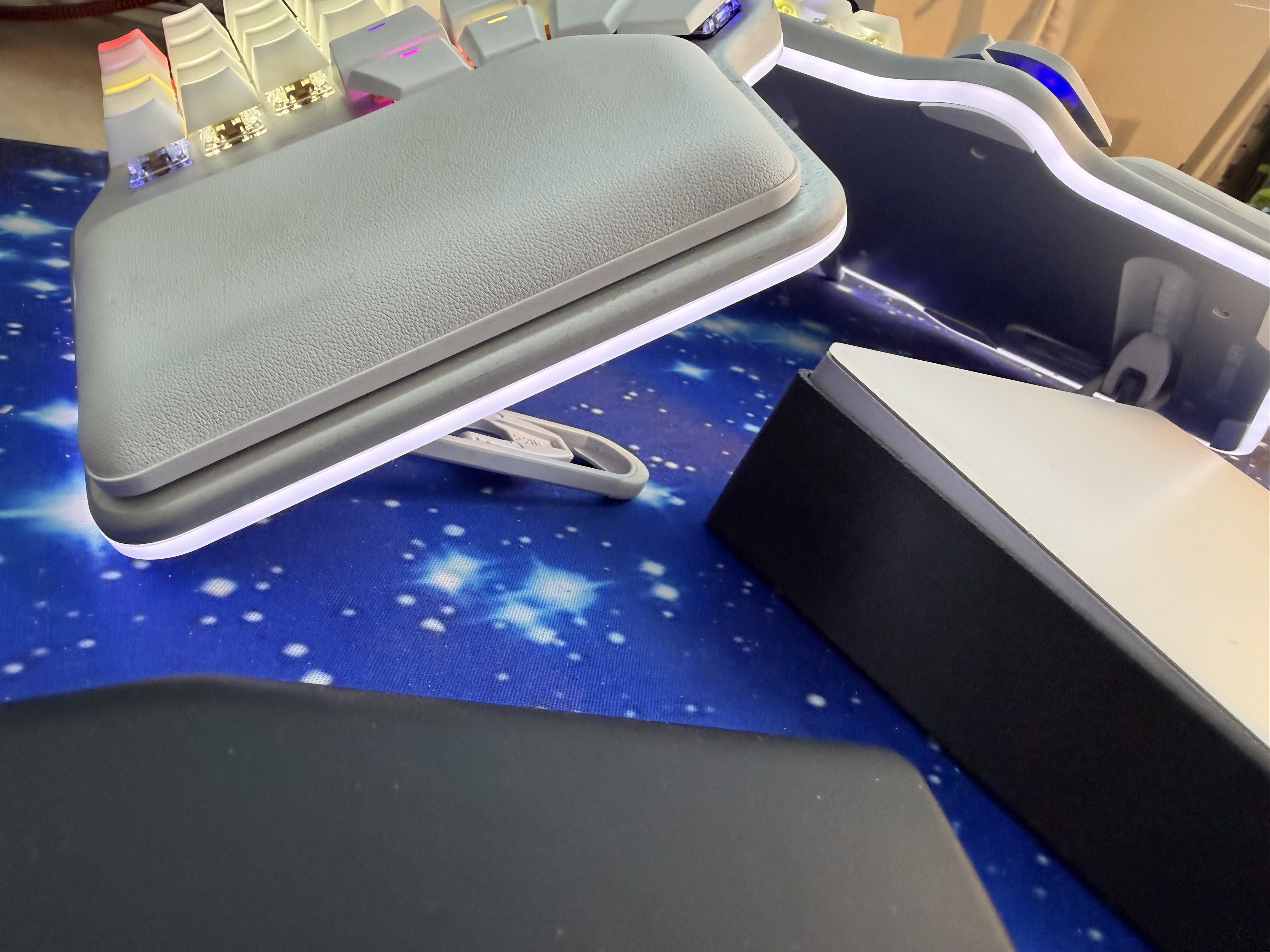
Allerdings: Wenn man steiler als 25 Grad geht, wird es wackelig. Da stößt die mitgelieferte Lösung an ihre Grenzen. Ich überlege deshalb, mir mit dem 3D-Drucker etwas Eigenes zu bauen — eine stabilere Halterung, die auch steilere Winkel erlaubt. Die passende Idee dafür fehlt mir noch, aber das Projekt schwirrt im Hinterkopf rum. Es gibt auch andere Lösungen mit irgendwelchen Stativen, aber das muss dann auch irgendwie am Schreibtisch angeschraubt werden oder so. Alles nicht so meins gerade und zu wenig flexibel.
Das Tenting allein war es dann aber auch nicht. Ein weiterer Grund war der ständige Kampf mit zu wenig Tasten (zumindest für mich). Das hat mich immer wieder beschäftigt, und immer zwischen den Layern hin und her wechseln ist etwas unschön.
Ein echt nettes Feature ist die Bluetooth Connectivity. Das ist super, ich kann mein Defy per Bluetooth mit dem iPad verbinden und per Kabel mit dem Mac - umschalten läuft super. DAS geht mit dem Keyboardio gar nicht. Auch, dass die beiden Hälften des Defy kein Kabel brauchen ist schön. Hat mich jetzt auch nicht soo gestört, aber ohne ists schöner 😉
Und einer der Vorteile vom Model100 ist ja die coole quasi "Curved" Anordung der speziell geformeten KeyCaps. DAs fühlt sich beim tippen super an (es sei denn, die Tasten sind abgegriffen), aber leider kann man ausschließlich die KeyCaps von Keyboardio verwenden. Das ist doof.
Versteht mich bitte nicht falsch: das Model100 ist ein wahnsinnig tolles Keyboard! Empfehle ich jedem, der ein Split-Keyboard sucht. Aber wenn man noch eine "Schippe" drauf legen will, ist das Defy einfach besser.
Wireless: Kabellos ist Freiheit
In meinem ersten Artikel hatte ich noch ein paar Bluetooth-Probleme erwähnt. Nach 12 Monaten kann ich sagen: Das hat sich komplett erledigt. Das Board läuft stabil, egal ob über Bluetooth, über den USB-Dongle oder per Kabel. Und genau diese Flexibilität ist großartig — im Büro völlig Kabellos (Gateron Brown Silent, die Kollegen danken es mir), zu Hause läuft es über Kabel. Wenn doch mal was nicht will, steckt man kurz das Kabel ein und gut ist. Kein Stress.
Das kabellose Arbeiten ohne Verbindungskabel zwischen den beiden Hälften ist übrigens nicht zu unterschätzen. Man kann die Hälften hinstellen, wie man will, in jedem Winkel, in jedem Abstand. Das alleine war schon den Umstieg vom Model 100 wert. Ich habe es oben schon erwähnt, die Möglichkeit, Bluetooth mit kabel zu kombinieren oder eben auch mehrere Geräte per Bluetooth anzubinden (bis zu 4) ist super. Gerade für jemanden, der mehrere Computer / Tablets und Co hat ist das hilfreich.
Layout: QWERTZ bleibt, ADNW-XOY wartet
Ich tippe aktuell QWERTZ. Ja, ich weiß — als jemand, der sich so intensiv mit Keyboards beschäftigt, "sollte" man eigentlich auf ein optimiertes Layout wechseln. Ich habe mich auch an ADNW-XOY versucht, und das Layout liegt sogar noch auf einem Layer bereit. Aber ehrlich: Ich schaffe den Umstieg nicht. Irngendwann bekomme ich wieder nen "Rappel" und denke, ich werde jetzt umsteigen. Und dann Schalte ich auf XOY um und.... 10 min später bin ich wieder zurück. Das klappt leider nicht.
Das Problem ist nicht nur das Tippen selbst (das könnte man irgendwann in den Griff bekommen). Es ist alles drumherum. Die Muscle-Memory für hjkl in Vim(!), für CMD-C / CMD-V, für all die Shortcuts, die einem in Fleisch und Blut übergegangen sind — die funktioniert mit einem neuen Layout einfach nicht mehr. Und dann sitzt man da, tippt mit gefühlt 20 WPM(eher weniger), und jeder Shortcut wird zum Suchspiel. Irgendwann wechselt man dann doch wieder zurück auf QWERTZ, weil man ja eigentlich arbeiten wollte.
Vielleicht irgendwann mal im Urlaub. Vielleicht. Und auch da bin ich zu ungeduldig.
Da ich aber immer irgendwelche Tasten am Board umkonfiguriere könnte man auch schrittweise umsteigen. Aber das ist sicher noch dämlicher. Also bleibe ich bei QWERTZ - damit tippe ich ca. 100wpm wenn es drauf ankommt und ich muss nicht suchen.
Thumb-Cluster: Das Herzstück
Der Thumb-Cluster ist für mich das wichtigste Feature am Defy. Ich nutze ihn intensiv. Links liegen Delete, Backspace, Hyper/CMD und ein paar Layer-Switches. Rechts Space, Enter und ebenfalls CMD. Auch CTRL und ALT hab ich da hin gelegt. Das ist der große Vorteil gegenüber dem Model100 - genug Tasten!
Eine Sache, die mich an der Standard-Konfiguration sofort gestört hat: Shift liegt per Default auf dem Daumen. Klingt logisch, ist es auch — aber ich konnte mich damit nicht anfreunden, weil es mein gesamtes bisheriges Muskelgedächtnis durcheinandergebracht hat. Also habe ich das direkt umkonfiguriert. und zum Glück ist das Defy ja programmierbar.
SuperKeys und Homerow-Mods: Schöne Theorie
Ich habe einige Zeit mit SuperKeys und Homerow-Mods experimentiert. Die Idee ist bestechend: weniger Tasten, mehr Funktionalität, Finger bleiben auf der Home-Row. In der Praxis hat zumindest Homerow-Mods bei mir nicht funktioniert.
Ich "rolle" beim Tippen zu viel — das heißt, ich drücke die nächste Taste schon, bevor ich die vorherige komplett losgelassen habe. Bei Homerow-Mods führt das zu ständigen Fehlauslösungen. Mal wird ein a zum CMD, mal triggert ein schnelles sd irgendeinen Layer-Switch. Nach ein paar Wochen Frustration habe ich es aufgegeben.
Umso besser, dass der Defy genug Tasten im Thumb-Cluster hat, um die ganzen Modifier dort unterzubringen. Das ist deutlich zuverlässiger als jedes Timing-basierte System. Aber die SuperKeys sind super. damit kann man wirklich praktische Dinge erledigen:
- Tab kurz drücken: Tab
- Tab halten: Shift-Tab
oder, und das nutze ich wirklich: n tippen, gibt das normale n (logisch), aber halten macht ~, gleiches mit e/€ und l/@ - super! und da ich den Timeout entsprechend eingestellt habe, bekomme ich aktuell nur sehr selten Fehlauslösungen (würde vermutlich für Homerow-Mods immer noch nicht reichen - die meisten fehler habe ich aktuell beim "l").
Aber auch so was wie: Tippen ist CMD-C, Halten CMD-V, tippen, dann Halten CMD-X geht. und viel mehr. Cooles Konzept, werde ich mehr nutzen. hab z.B. Alt so eingestellt, dass halten Alt gibt, aber tippen gibt + - wieder ne Taste gespart.
Switches: Die Freude am Wechseln
Hot-Swap ist eines dieser Features, von denen man erst merkt, wie gut sie sind, wenn man sie hat. Ich habe in den 12 Monaten einiges durchprobiert: Angefangen mit den Gateron Brown Silent (leise, taktil, bürotauglich) und den Gateron White Clicky (laut und befriedigend). Dann kamen Boba Switches dazu, und aktuell habe ich zu Hause richtig schön thocky laute Switches drin, deren Name mir ehrlicherweise komplett entfallen ist.
Im Büro sind wieder die Gateron Brown Silent drin — denn so gerne ich klackere, meine Kollegen sehen das anders.
Der Punkt ist: Man kann einfach mal den Charakter des Keyboards verändern. Anderer Switch, anderes Tippgefühl, andere Stimmung. Das klingt nach Spielerei, ist es wahrscheinlich auch — aber es macht Spaß.
Keycaps: Licht und Schatten
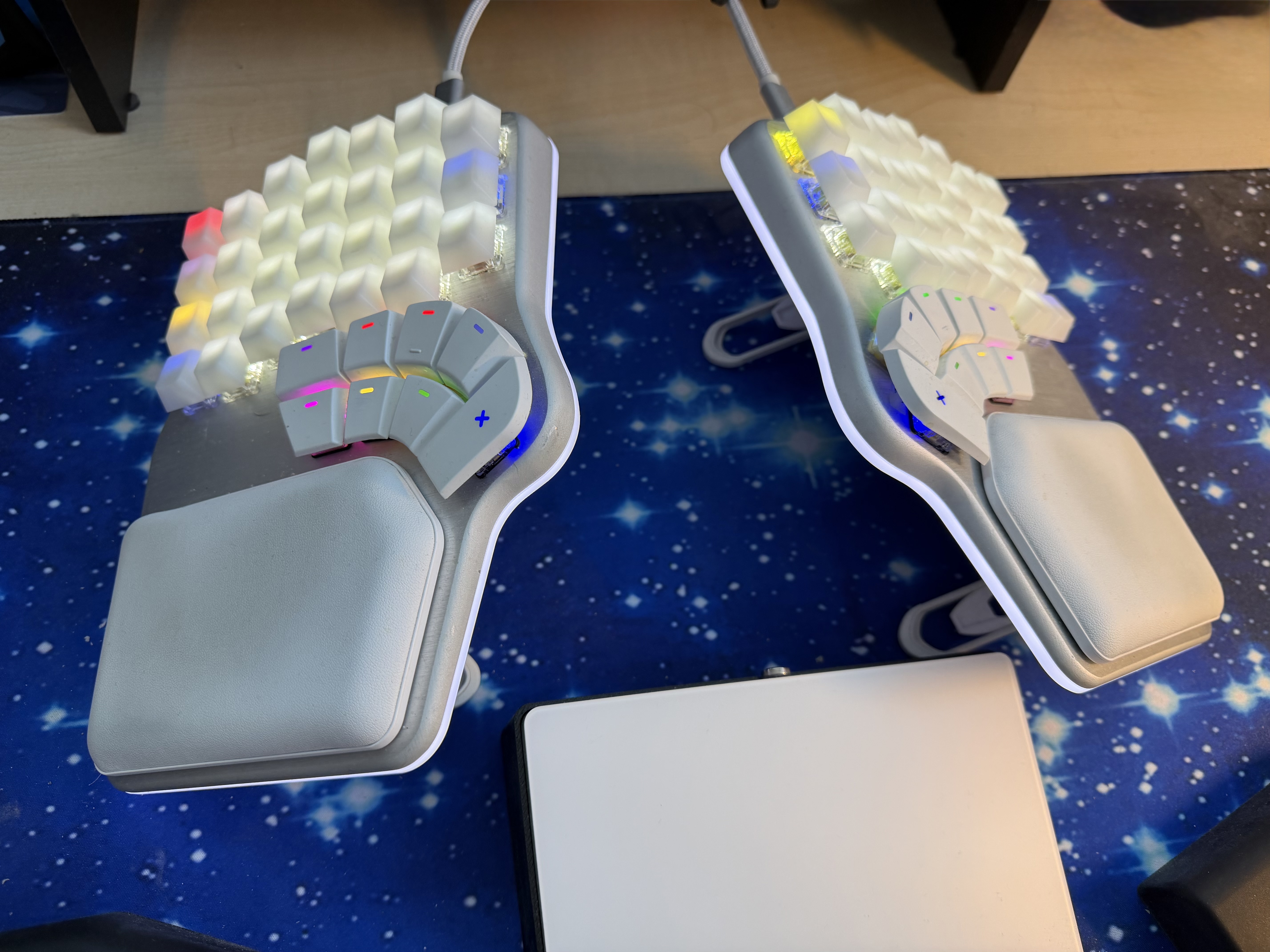
Aktuell habe ich blanke PBT-Keycaps von Ranked drauf. Die fühlen sich gut an und sehen clean aus. Aber wenn ich einen Wunsch frei hätte: Ich würde sofort die Linear-A Keycaps von Keyboardio nehmen. Diese Symbole aus der minoischen Schrift als Legends — das hat Stil und löst nebenbei das Problem, dass Keycap-Beschriftungen bei alternativen Layouts ohnehin nicht stimmen.
Leider gibt es die nicht für das Defy.
Was mich außerdem stört: Man kann zwar normale Cherry-MX-Keycaps für die Haupttasten verwenden, aber für den Thumb-Cluster braucht man spezielle Kappen. Die Standard-Caps passen dort nicht. Das schränkt die Auswahl ein, und bei mir sieht das Ganze gerade etwas zusammengewürfelt aus — die blanken Ranked-Caps auf dem Hauptfeld, und die originalen Defy-Caps auf dem Thumb-Cluster.
Bazecor: Hat sich gemacht
In meinem ersten Artikel hatte ich noch einige Bugs in Bazecor erwähnt. Das hat sich deutlich gebessert. Die Software funktioniert mittlerweile gut, ist übersichtlich und macht das Anpassen von Layouts und Layers wirklich einfach. Ich finde mich da regelmäßig wieder, wenn ich etwas umkonfiguriere — und es funktioniert einfach. Keine Abstürze, kein Datenverlust, solide Software.
RGB-LEDs: Spielerei, die Spaß macht
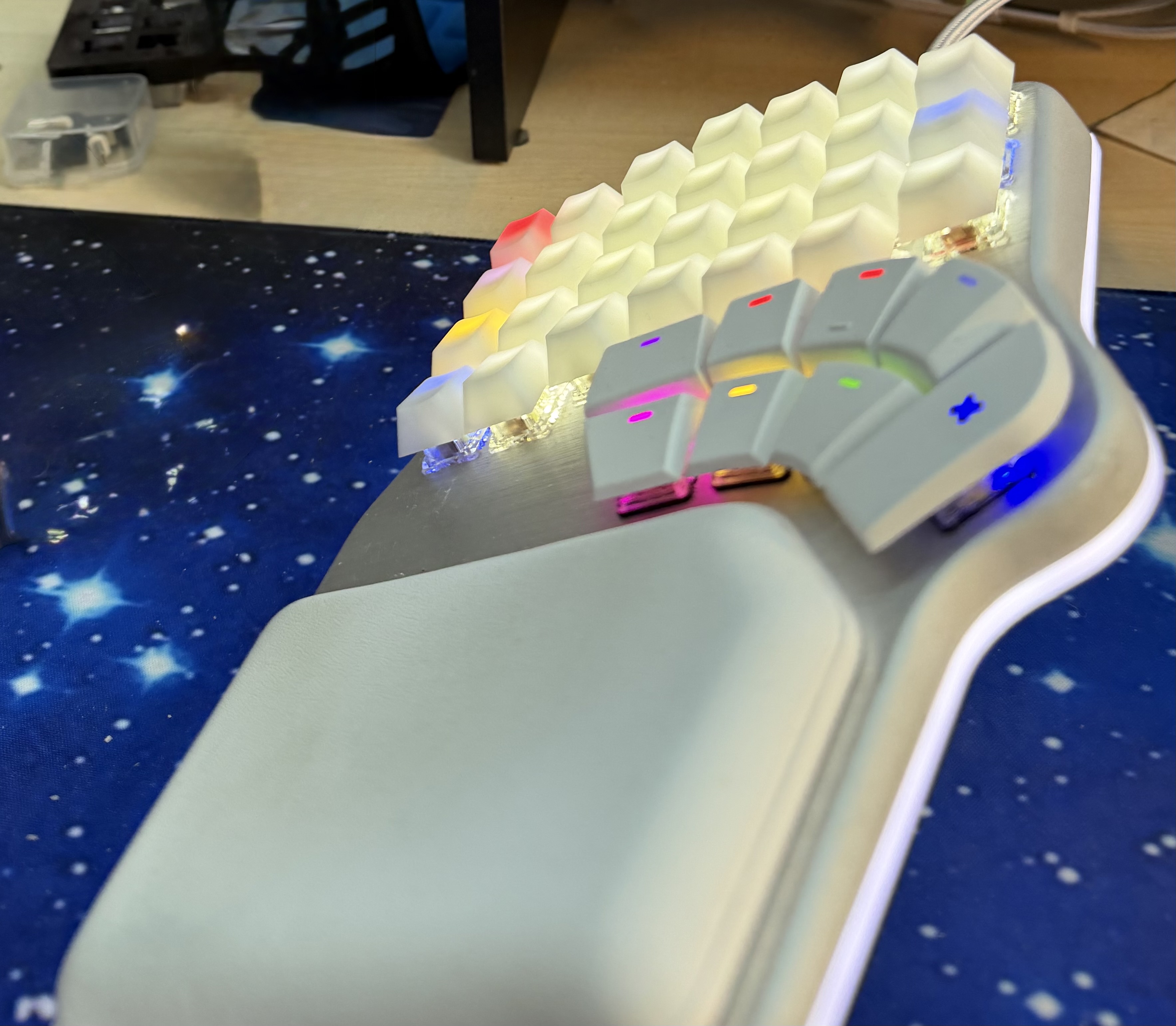
Ja, die RGB-Beleuchtung war tatsächlich ein Grund, warum ich mir das Defy geholt habe. Keine Sorge, ich weiß, dass das kein rationales Kaufargument ist. Aber es macht einfach Spaß, abends in einem abgedunkelten Raum zu tippen und das Keyboard leuchtet in den Farben, die man sich ausgesucht hat. Die LED-Effekte sind zwar weniger vielfältig als beim Model 100, aber für eine nette Beleuchtung reicht es allemal.
Firmware: Funktional, aber ausbaufähig
Für das Keyboardio Model 100 hatte ich mir eine eigene Firmware geschrieben — mit ein paar Spielereien und Anpassungen, die über das hinausgehen, was die Standard-Software bietet. Die wollte ich auch auf das Defy portieren, aber das klappt bisher nicht richtig. Die Firmware-Architektur ist eine andere, und ich bin noch nicht dazu gekommen, mich da richtig reinzufuchsen.
Also bin ich aktuell auf der Standard-Firmware des Defy, konfiguriert über Bazecor. Das funktioniert, ist solide, macht was es soll. Aber es fehlt ein bisschen das verspielte Element, das ich beim Model 100 mit meiner Custom-Firmware hatte.
Fazit nach 12 Monaten
Würde ich das Dygma Defy wieder kaufen? Ja.
Es ist nicht perfekt — das Tenting könnte stabiler sein bei steileren Winkeln, die Keycap-Situation für den Thumb-Cluster ist ärgerlich, und die Firmware-Customization ist nicht so offen wie beim Keyboardio. Aber in der Summe ist es das beste Split-Keyboard, das ich bisher hatte. Der Thumb-Cluster ist hervorragend, Hot-Swap-Switches sind ein tolles Feature, Wireless funktioniert zuverlässig, und das Tenting funktioniert im Bereich bis 25 Grad gut.
Für wen ist es das Richtige? Für alle, die bereits wissen, dass sie ein Split-Keyboard wollen, und denen Tenting und ein großer Thumb-Cluster wichtig sind. Wer von einem normalen Keyboard kommt, sollte sich darauf einstellen, dass die Umstellung ein paar Wochen dauert — aber es lohnt sich. Und wer wie ich nach einem Unfall oder bei RSI-Problemen auf eine ergonomische Lösung angewiesen ist: Der Defy ist aktuell meine Empfehlung.
Und wenn jemand von Dygma das hier liest: Linear-A Keycaps für den Defy. Bitte.
Meine Split-Keyboard-Historie: Ergodox-EZ → Keyboardio Model 01 → Keyboardio Model 100 → Dygma Defy